At the boats, follow your selected party’s counter rather than assuming every run needs four players.
Source review: September 10, 2026. This guide covers How to Really Fish by Crazy Fishing Friends on Roblox, place ID 112778631702542. The official listing describes the game as beta. The PC reference below comes from screenshots accompanying a guide updated on September 6; the capture date and build are unknown. This is a source-based guide, not a live-game test. Follow your current interface whenever it differs.
Open the correct Roblox experience
Use the official How to Really Fish page and check that the creator is Crazy Fishing Friends.
The Roblox listing mentions inspiration from How to Fish. That is not confirmation that guides for the separate Steam game apply here. Match the platform and place ID before using an item list, quest route, or control guide.
PC controls visible in the inspected interface
These bindings are visible in the rod-equipped PC screenshot. The mouse icons highlight different buttons for casting and punching.
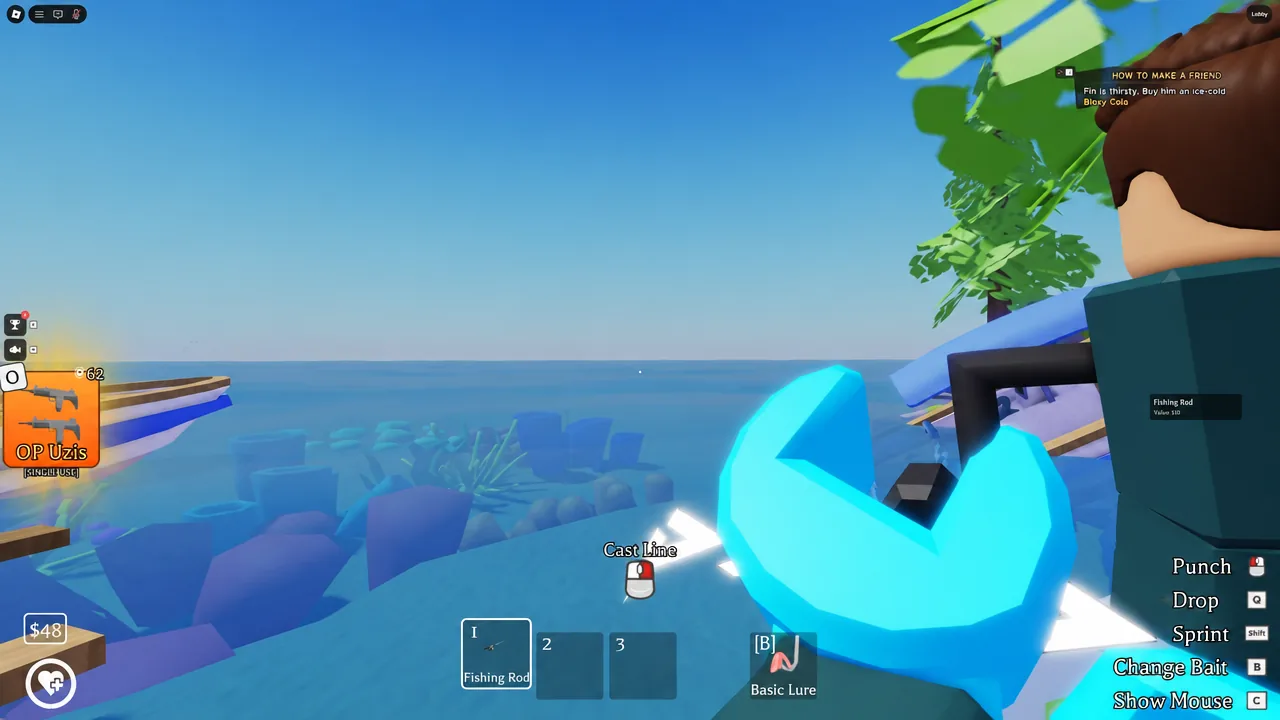
| Action shown | PC input shown | Scope |
|---|---|---|
| Cast Line | Right mouse button | The Fishing Rod is equipped in this image. |
| Punch | Left mouse button | This is a separate action from casting. |
| Change Bait | B | A control prompt, not proof that every bait is unlocked. |
| Drop | Q | Do not confuse dropping with selling an item. |
| Sprint | Shift | The movement input shown in the image. |
| Show Mouse | C | The fishing view uses this label; the lobby image labels C as Mouse Lock. |
The official listing also names E among the PC inputs, but does not explain its action. This guide does not assign E to a guessed interaction. It also does not infer the reeling input from a screenshot of the casting state.
I click, but my character punches
First check that the Fishing Rod is equipped and read its current action prompt. In the pictured state, casting uses the right mouse button, while the left mouse button punches. If your current prompt differs, use the prompt rather than treating this reference as a guaranteed fix.
I need the cursor to select something
Check whether your interface currently displays the C mouse-control prompt. Use the action indicated there rather than guessing another key. This is an interface check, not confirmation of a cursor bug or a universal repair procedure.
Joining a boat party
The September 6 beginner walkthrough describes entering the lobby and stepping onto the yellow platform to join a boat party.
Once you are at the boats, use this checklist:
- Check the counter belonging to the party you selected, not a neighboring boat.
- Watch that party's departure countdown when it appears.
- If you intend to leave the queue before departure, use the visible Leave control.
These are checks for the displayed queue state, not a confirmed workaround for teleport failures.
Does every party need four players?
Do not assume that. The inspected lobby image shows one party at 4/4 and another at 2/2, both with a departure countdown visible. A four-person example is therefore not enough evidence for a universal four-player requirement.
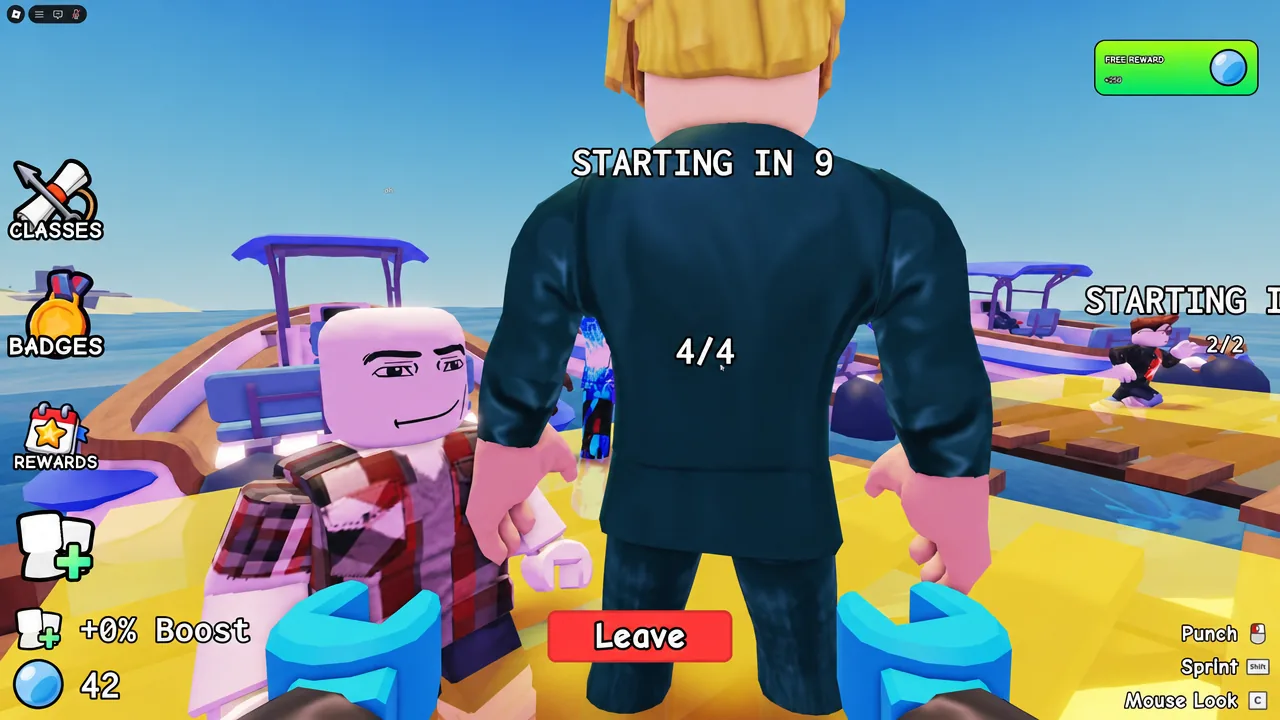
The same image does not establish whether solo departure is available, which party sizes can be selected today, or the current minimum and maximum. Read the options shown in your session instead of treating this screenshot as a complete party-size specification.
Mobile controls
The official Roblox description specifies on-screen buttons for mobile play. The keyboard table above is not a touchscreen control map. This review did not obtain a verified mobile interface, so it does not assign button positions or translate every PC binding into a guessed mobile gesture.
Before treating an input problem as a game bug
Check the game identity, your input platform, the equipped tool, and the current action prompt first. These are diagnostic suggestions based on the available interface evidence, not developer-confirmed fixes. A different screen may require different actions; this guide does not promise that reconnecting, resetting, or dropping an item will solve a problem.
Back to the How to Really Fish guide hub
Independent guide. Not affiliated with Roblox or Crazy Fishing Friends. No in-game testing was performed for this source review.
Quick answers
Does every party need four players?
Do not assume a universal four-player requirement. The inspected lobby image shows both 4/4 and 2/2 parties with countdowns.
Which mobile controls are confirmed?
The official Roblox description specifies on-screen buttons. The PC table is not a touchscreen control map.